

Visual bug reporting for websites
Catch bugs.
Get clean tickets.
One script tag adds a feedback button to any site. Every report lands as an annotated screenshot with browser, viewport and console data attached, ready to triage in one inbox and push out via webhooks or the API.
- 2-minute install
- Widget ≤150 KB, async
- 14-day free trial, no card needed
The problem
“It looks weird on my screen” is not a bug report
You can’t reproduce what you can’t see. Bugpot turns vague emails into structured tickets, captured the moment the problem happens, on the device where it happens.
Before · what clients send
From: client@example.com · Re: Re: Fwd: website
“Hi, the button looks weird on my screen?? It worked last week. Can you fix before the meeting, it’s quite urgent. Attached a photo of my monitor.”
- Which button? Which page?
- Which browser, which device?
- Any console errors? No idea.
After · the same report, through Bugpot
Pay button clipped below 400px viewport
Open- Browser
- Safari 18.2 · iOS 18
- Viewport
- 390 × 844 @3x
- URL
- /checkout?step=payment
- Console
- 1 error captured
The real thing
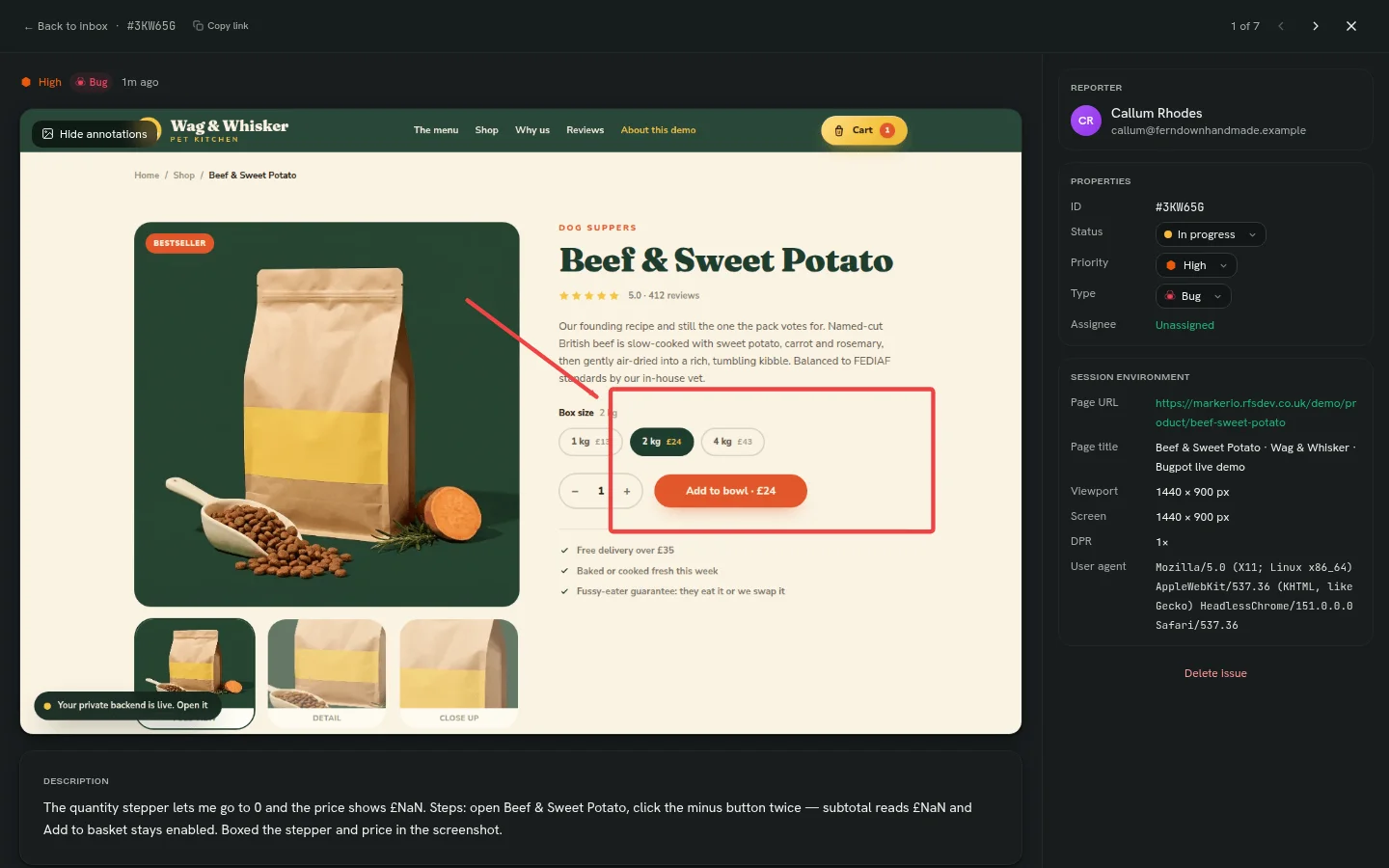
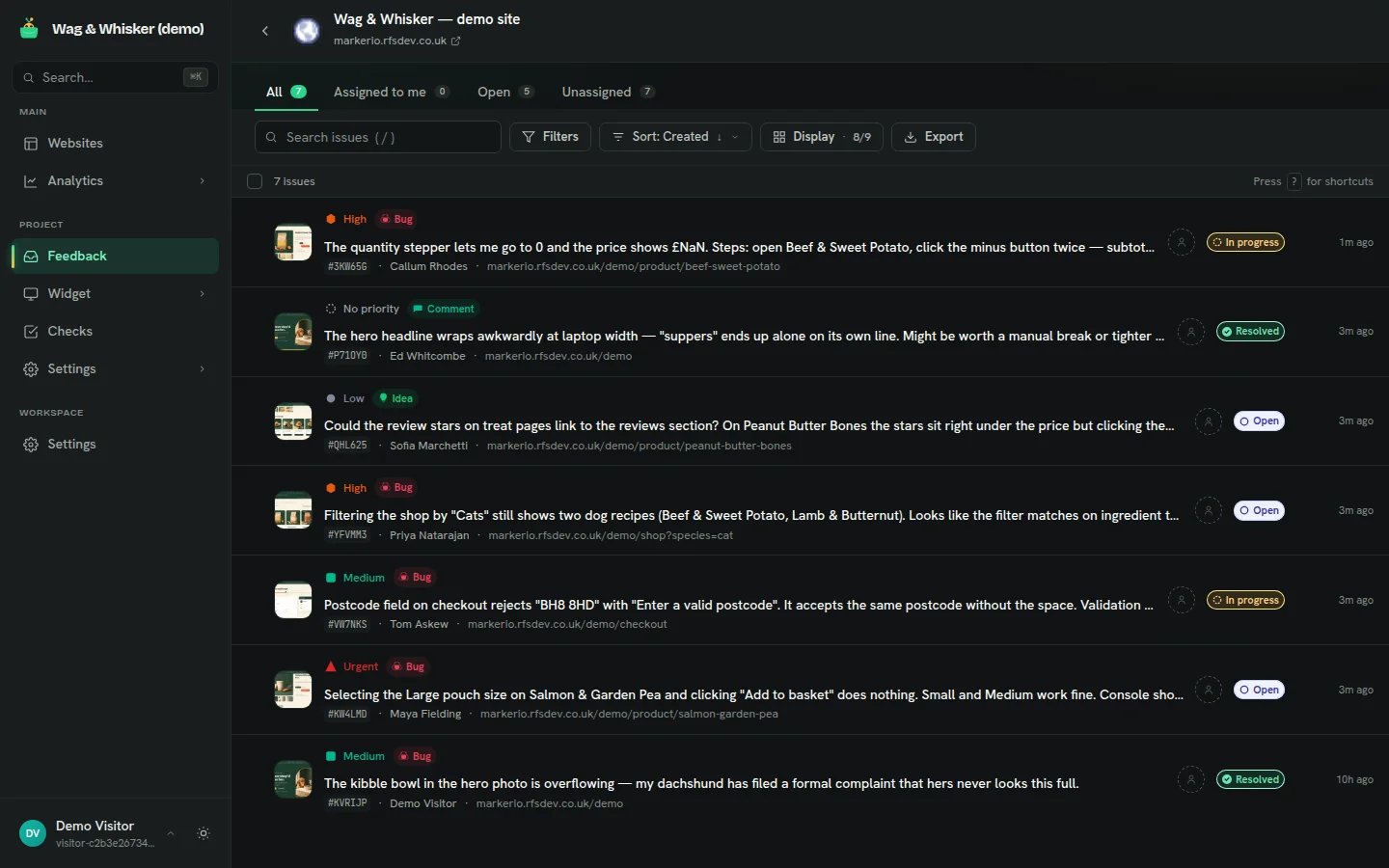
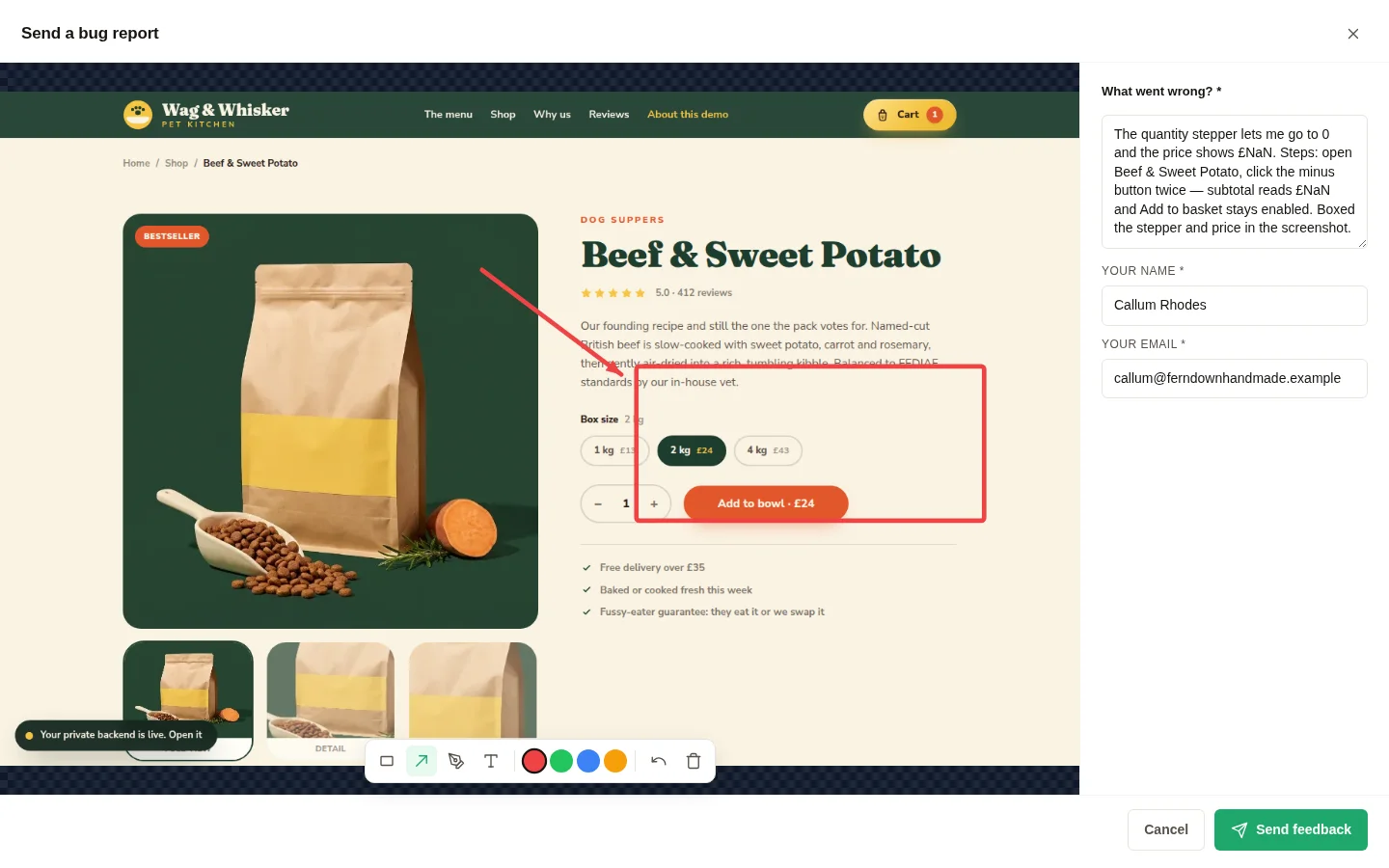
This is what a bug report looks like now
Not a mock-up. These are live screenshots from our interactive demo, which you can try right now. Pixel-faithful capture, annotations, and the environment data your developer actually needs.


How it works
From script tag to triage in three steps
- 1<scriptasync/>
Install the widget.
Paste one script tag into your site, or your client’s. It loads async and renders in a Shadow DOM, so nothing on the page breaks.
- 2Feedback
Clients click Feedback.
They mark up a live screenshot with arrows and notes, pick an issue type, and hit send. Name and email included, nothing to install.
- 3BUG-12OpenLinear
You triage & ship.
Reports arrive with full environment data and console errors. Set status, assign, comment, and forward via webhooks or the API. One-click tracker push lands 1 October 2026.
The whole install
<scriptasyncsrc="https://app.bugpot.io/embed/loader.js?p=your_project_key"></script>
Paste before </body>. Loads async, never blocks your page.
The complete toolkit
Everything a bug needsto become a fix.
Not just a screenshot. Bugpot packages the visual evidence, technical context and team workflow into one report that’s ready to act on.
Show it
Capture
Know it
Diagnose
Checkout button disappeared on mobile
- browser
- Safari 18.1 · iOS
- viewport
- 390 × 844 @3x
- route
- /checkout/payment
- console
- TypeError × 2
- network
- POST /pay → 500
Root cause found
Close it
Ship
Checkout button disappears on mobile
Screenshot, device context and console trace attached automatically.
And the rest of the pot.
The small things aren’t small. Hover any of them for the detail.
- Console error captureconsole-error-captureJavaScript errors on the page are recorded and attached to the report, stack trace included.
- Network request capturenetwork-request-captureFailed and slow requests around the moment of capture ride along with each report.
- Custom metadata on reportscustom-metadata-on-reportsAttach your own key-value data (build number, tenant, feature flags) via the widget API.
- Guest reporting, no accountsguest-reporting-no-accountsClients report with just a name and email. No sign-up, no password, no friction.
- Separate guest & member formsseparate-guest-member-formsShow clients a simple form and your team the full one, each configured separately.
- Per-type custom fieldsper-type-custom-fieldsBugs, ideas and questions each get their own fields, so every type arrives complete.
- Drag-to-reorder form builderdrag-to-reorder-form-builderBuild feedback forms by dragging fields into order: severity pickers, dropdowns, checkboxes.
- Bulk triage from the inboxbulk-triage-from-the-inboxSelect a batch of reports and set status, priority or assignee in one action.
- Saved filters & ⌘K palettesaved-filters-k-paletteSave the views you triage daily and jump anywhere with the command palette.
- Keyboard-first workflowkeyboard-first-workflowEvery triage action has a shortcut, so you can clear an inbox without touching the mouse.
- Report thumbnails & searchreport-thumbnails-searchScan screenshots at a glance and full-text search every report you have ever received.
- Two-way status synctwo-way-status-syncFrom 1 October 2026: close it in Jira and it resolves in Bugpot, and the other way round.
- 15 tracker integrations15-tracker-integrationsJira, GitHub, GitLab, Linear, Asana, Trello, ClickUp and more. One-click push lands 1 October 2026.
- Slack & Teams alertsslack-teams-alertsNew reports land in the channel you choose, with screenshot and severity inline, from 1 October 2026.
- Email notifications & digestsemail-notifications-digestsInstant alerts or a daily digest, each teammate picks their own cadence.
- Signed webhooks + replay logsigned-webhooks-replay-logHMAC-signed payloads with a delivery log you can replay when an endpoint was down.
- Audit log with CSV exportaudit-log-with-csv-exportEvery action, timestamped and exportable, ready for the compliance folder.
- AI titles, rewrites & translationai-titles-rewrites-translationLet AI title vague reports, tidy descriptions and translate feedback into your language.
- Workspace branding on the widgetworkspace-branding-on-the-widgetYour logo and colours on the feedback button and form, so it reads as your product.
- White-label footer on Agencywhite-label-footer-on-agencyRemove “Powered by Bugpot” entirely on the Agency plan.
- Screenshot data maskingscreenshot-data-maskingSensitive fields blur in the browser before the screenshot is ever created.
- Multi-project workspacesmulti-project-workspacesOne workspace, many sites, each project with its own widget, forms and inbox.
- Role-based permissionsrole-based-permissionsOwners, admins and members, each sees exactly what their role allows.
- Storage quotas per projectstorage-quotas-per-projectCap screenshot storage per project so one busy site cannot crowd out the rest.
After the report
Feedback becomes a queue you can clear
Every report lands as a ticket with a status, a priority and an owner. Filter by site, type or reporter; keep discussion on the ticket; watch resolution times fall on the analytics dashboard.
- Pay button clipped below 400pxHighOpen
- Hero image blurry on retinaMediumIn progress
- Typo in footer addressLowResolved
- Cookie banner overlaps navMediumOpen
How does the widget get onto my site?
You paste one script tag before the closing </body> tag. It loads asynchronously, renders inside a Shadow DOM so it can never clash with your CSS or JavaScript, and stays under 150 KB gzipped.
What arrives with each bug report?
An annotated screenshot of the exact page state, the page URL, browser and OS versions, viewport size and device pixel ratio, captured console errors, and any custom form fields you configure, plus the reporter’s name and email.
Do my clients need an account to report bugs?
No. Guests report through the widget with just a name and email. Your team gets accounts for the triage inbox, statuses, priorities and comments.
Does it sync with my issue tracker?
Tracker sync lands 1 October 2026, covering Jira, GitHub, GitLab, Linear and more, with status flowing back both ways. Until then, use webhooks or the API.
Will the widget slow my site down?
The loader is async and deferred, so it never blocks your page render. The widget only initialises after your page finishes loading, and screenshot capture runs entirely in the browser.


Put a feedback button on your site today
Install in two minutes and triage the first report before the kettle boils. Webhooks and API from day one; two-way tracker sync 1 October 2026.